Dapr Asp.Net Core HTTP 调用

dotnet-invoke-http

Posted by ZhangX on 2020-11-10

版本介绍

  • Dotnet 版本:5.0.100
  • Dapr dotnet 版本:0.12.0-preview01

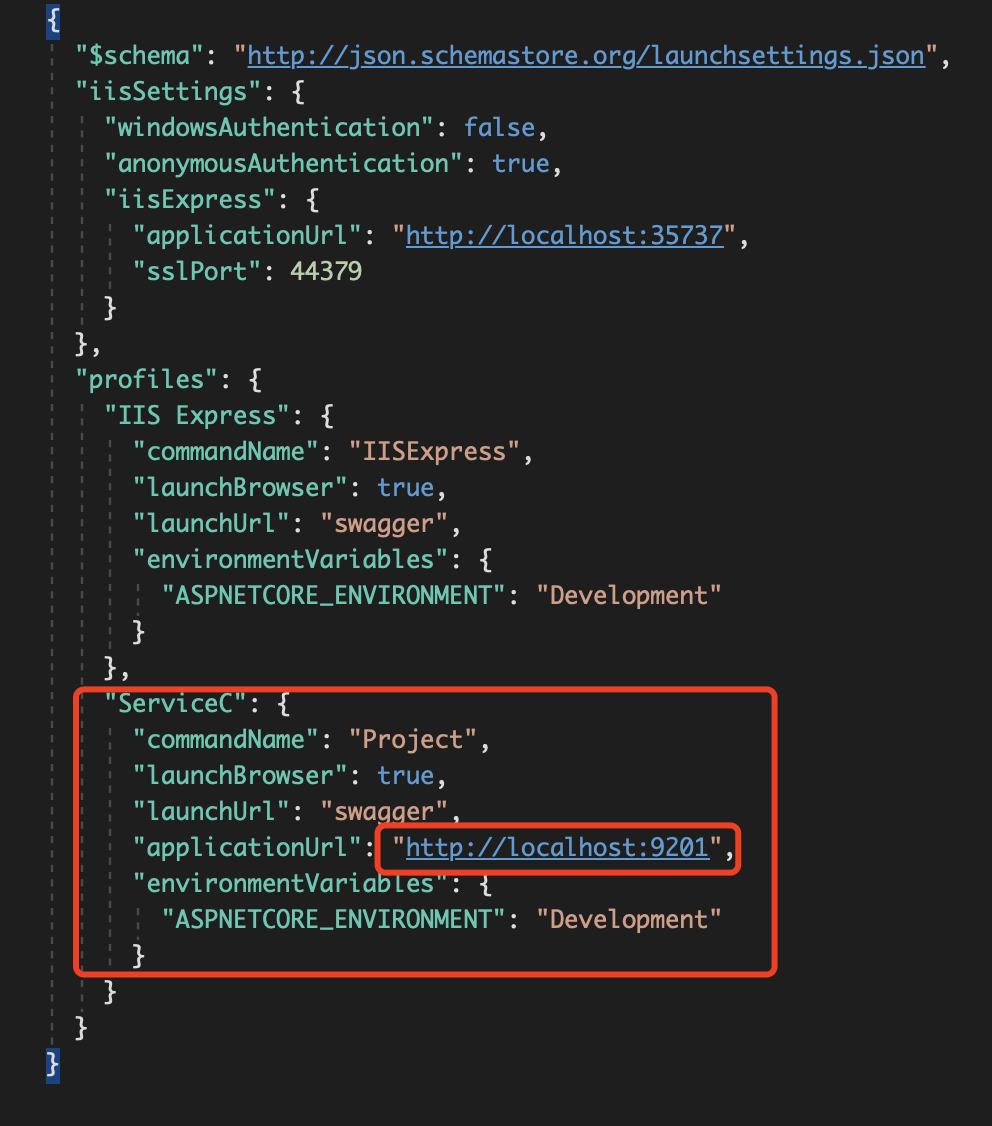
注意: Asp.Net Core 项目中的 launchSettings.json 文件,该文件的中的端口号应和 darp --app-port 端口号相同,否则 dapr 无法正常启动 Asp.Net Core 项目。

httplaunchsetting

工程结构

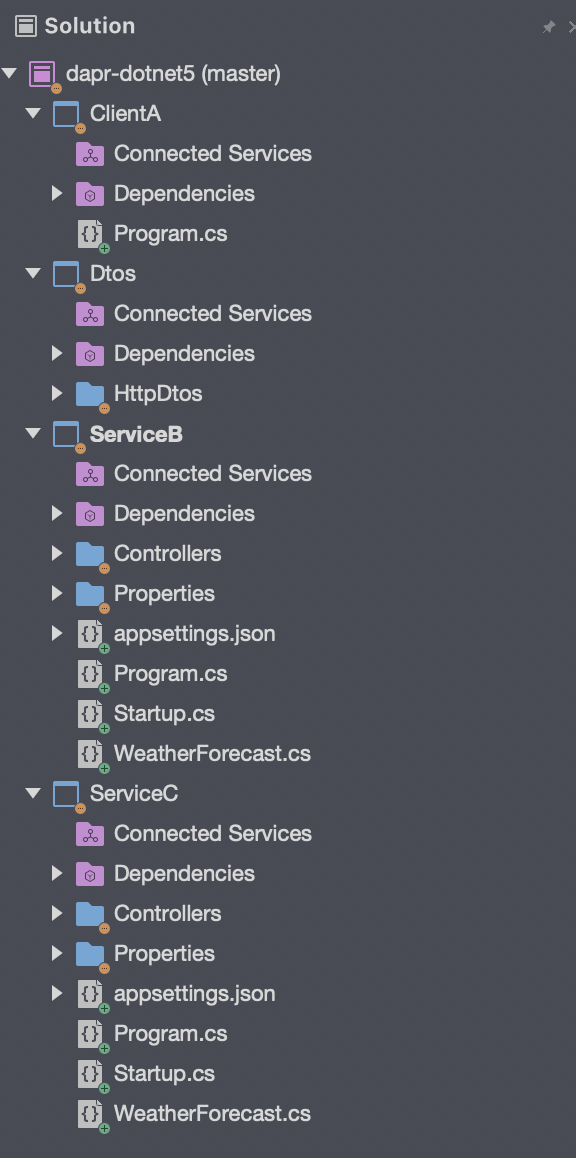
项目结构

3 个 .NET 5 项目,ClientA、ServiceB、ServiceC。1 个 .NET Standard 项目,Dtos 。Dtos 用于存储各种传输模型。调用路径如下图所示。新建两个 service 的意义在于展示 http 链路调用通过 dapr 如何实现。

graph LR;
    dotnet5-client-a--1-->dotnet5-service-b;
    dotnet5-service-b--2-->dotnet5-service-c;
    dotnet5-service-c--3-->dotnet5-service-b;
    dotnet5-service-b--4-->dotnet5-client-a;
  1. dotnet5-client-a 做为客户端调用服务 dotnet5-service-b;
  2. dotnet5-service-b 做为服务中转,既收来自 dotnet5-client-a 客户端的请求,又发起对 dotnet5-service-c 的调用;
  3. dotnet5-service-c 响应 dotnet5-service-b 的请求;
  4. dotnet5-service-b 响应 dotnet5-client-a 的请求。

ServiceC

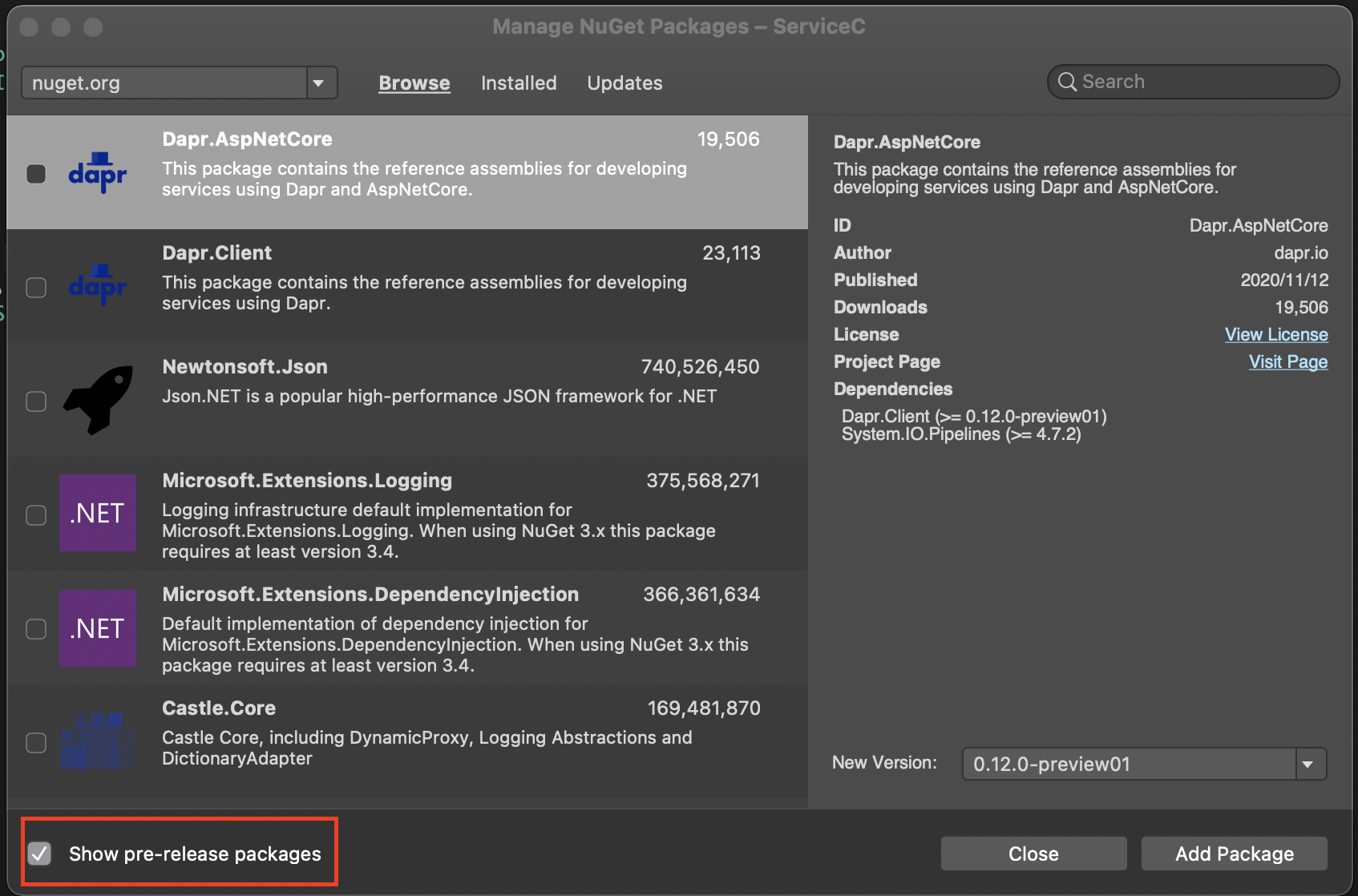
ServiceC 做为 http 调用链路调用终端只需监听 http 调用端口。通过 nuget 包管理工具,选中->Show pre-release packages,搜索 dapr ,选中 Dapr.AspNetCore 安装包。

httplaunchsetting

Startup

在 ConfigureServices(IServiceCollection services) 方法中通过链式调用 AddDapr() 方法注册 Dapr 到 IOC 容器中。内容如下:

1
2
3
4
5
6
7
8
9
10
11
12
13
14
15
16
17
18
19
20
21
22
23
24
25
26
27
28
29
30
31
32
33
34
35
36
37
38
39
40
41
42
43
44
45
46
using System.Text.Json;
using Microsoft.AspNetCore.Builder;
using Microsoft.AspNetCore.Hosting;
using Microsoft.Extensions.Configuration;
using Microsoft.Extensions.DependencyInjection;
using Microsoft.Extensions.Hosting;

namespace ServiceC
{
public class Startup
{
public Startup(IConfiguration configuration)
{
Configuration = configuration;
}

public IConfiguration Configuration { get; }

// This method gets called by the runtime. Use this method to add services to the container.
public void ConfigureServices(IServiceCollection services)
{
services.AddControllers().AddDapr().AddJsonOptions(options => {
options.JsonSerializerOptions.PropertyNamingPolicy = JsonNamingPolicy.CamelCase;
options.JsonSerializerOptions.PropertyNameCaseInsensitive = true;
}
);
}

// This method gets called by the runtime. Use this method to configure the HTTP request pipeline.
public void Configure(IApplicationBuilder app, IWebHostEnvironment env)
{
if (env.IsDevelopment())
{
app.UseDeveloperExceptionPage();
}

app.UseRouting();
app.UseAuthorization();

app.UseEndpoints(endpoints =>
{
endpoints.MapControllers();
});
}
}
}

HelloController

在 HelloController 中添加 Talk 方法,打印接收的信息并告诉调用方当前服务是谁。具体内容如下:

1
2
3
4
5
6
7
8
9
10
11
12
13
[ApiController]
public class HelloController : Controller
{
[HttpPost("talk")]
public async Task<SomeResponseBody> Talk(SomeRequestBody someRequestBody)
{
Console.WriteLine(string.Format("{0}:{1}", someRequestBody.Id, someRequestBody.Time));
return await Task.FromResult(new SomeResponseBody
{
Msg = "This is ServiceC"
});
}
}

launchSetting.json

profiles.ServiceC.applicationUrl 端口号一定要修改为 --app-port 相同的端口号,否则通过 dapr 启动项目的时候无法正常启动

1
2
3
4
5
6
7
8
9
10
11
12
13
14
15
16
17
18
19
20
21
22
23
24
25
26
27
28
29
30
{
"$schema": "http://json.schemastore.org/launchsettings.json",
"iisSettings": {
"windowsAuthentication": false,
"anonymousAuthentication": true,
"iisExpress": {
"applicationUrl": "http://localhost:35737",
"sslPort": 44379
}
},
"profiles": {
"IIS Express": {
"commandName": "IISExpress",
"launchBrowser": true,
"launchUrl": "swagger",
"environmentVariables": {
"ASPNETCORE_ENVIRONMENT": "Development"
}
},
"ServiceC": {
"commandName": "Project",
"launchBrowser": true,
"launchUrl": "swagger",
"applicationUrl": "http://localhost:9201",
"environmentVariables": {
"ASPNETCORE_ENVIRONMENT": "Development"
}
}
}
}

启动

1
dapr run --app-id dotnet-server-c --app-port 9201 --dapr-http-port 3520 dotnet run

ServiceB

ServiceB 做为调用链中的一个中转节点,既要监听服务,同时还要发起请求。由于 Dapr.AspNetCore 已经引用了 Dapr.Client 。因此不需要再次引用 Dapr.Client

Startup

下面是 Dapr.AspNetCore AddDapr() 源码,从源码中可知 AddDapr() 方法向控制器中注册 Dapr 集成。同时通过依赖注入容器注册 DaprClient 。DaprClient 可以和 Dapr 运行时交互。比如 HTTP 调用,也正因为如此,ServiceB 的 Startup 文件我们只需拷贝 ServiceC 的 Startup 文件即可。源码如下:

1
2
3
4
5
6
7
8
9
10
11
12
13
14
15
16
17
18
19
20
21
22
23
24
25
26
27
28
29
30
31
32
33
34
35
36
37
38
39
40
41
/// <summary>
/// Provides extension methods for <see cref="IMvcBuilder" />.
/// </summary>
public static class DaprMvcBuilderExtensions
{
/// <summary>
/// Adds Dapr integration for MVC to the provided <see cref="IMvcBuilder" />.
/// </summary>
/// <param name="builder">The <see cref="IMvcBuilder" />.</param>
/// <param name="configureClient">The (optional) <see cref="DaprClientBuilder" /> to use for configuring the DaprClient.</param>
/// <returns>The <see cref="IMvcBuilder" /> builder.</returns>
public static IMvcBuilder AddDapr(this IMvcBuilder builder, Action<DaprClientBuilder> configureClient = null)
{
if (builder is null)
{
throw new ArgumentNullException(nameof(builder));
}

// This pattern prevents registering services multiple times in the case AddDapr is called
// by non-user-code.
if (builder.Services.Any(s => s.ImplementationType == typeof(DaprMvcMarkerService)))
{
return builder;
}

builder.Services.AddDaprClient(configureClient);

builder.Services.AddSingleton<DaprMvcMarkerService>();
builder.Services.AddSingleton<IApplicationModelProvider, StateEntryApplicationModelProvider>();
builder.Services.Configure<MvcOptions>(options =>
{
options.ModelBinderProviders.Insert(0, new StateEntryModelBinderProvider());
});

return builder;
}

private class DaprMvcMarkerService
{
}
}

HelloController

通过构造器注入 DaprClient 以发起 Http 调用 ServiceC 提供的服务。

1
2
3
4
5
6
7
8
9
10
11
12
13
14
15
16
17
18
19
20
21
22
23
24
25
26
27
[ApiController]
public class HelloController : ControllerBase
{

private readonly DaprClient daprClient;

public HelloController(DaprClient daprClient)
{
this.daprClient = daprClient;
}

[HttpPost("talk")]
public async Task<SomeResponseBody> Talk(SomeRequestBody someRequestBody)
{
var data = new { Time = DateTime.Now.ToLongDateString(), Id = "This is Service C." };
HTTPExtension httpExtension = new HTTPExtension()
{
Verb = HTTPVerb.Post
};
SomeResponseBody responseBody = await daprClient.InvokeMethodAsync<object, SomeResponseBody>("dotnet-server-c", "talk", data, httpExtension);

Console.WriteLine(string.Format("{0}:{1} \n recieve message:{2}", someRequestBody.Id, someRequestBody.Time, responseBody.Msg));
return await Task.FromResult(new SomeResponseBody
{
Msg = "This is ServiceB"
});
}

launchSetting.json

参考 ServiceC 更改端口号。

启动

1
dapr run --app-id dotnet-server-b --app-port 9200 --dapr-http-port 3521 dotnet run

ClientA

ClientA 的目的是发起对 ServiceB 服务的调用,因此只需添加 Dapr.Client 用于和 Dapr 运行时交互即可。内容如下:

1
2
3
4
5
6
7
8
9
10
11
12
13
14
15
16
17
18
19
20
21
22
23
24
25
26
27
class Program
{
static async Task Main(string[] args)
{
var jsonOptions = new JsonSerializerOptions()
{
PropertyNamingPolicy = JsonNamingPolicy.CamelCase,
PropertyNameCaseInsensitive = true,
};

var client = new DaprClientBuilder()
.UseJsonSerializationOptions(jsonOptions)
.Build();

var data = new { Time = DateTime.Now.ToLongDateString(), Id="This is Client A" };
HTTPExtension httpExtension = new HTTPExtension()
{
Verb = HTTPVerb.Post
};
while (true)
{
var a = await client.InvokeMethodAsync<object, SomeResponseBody>("dotnet-server-b", "talk", data, httpExtension);
Console.WriteLine(a.Msg);
await Task.Delay(5 * 1000);
}
}
}
每间隔 5 秒向 ServiceB 发送一次请求。

启动

1
dapr run --app-id dotnet5-http-client dotnet run

ClientA 接收内容:

1
== APP == This is ServiceB

SerivceB 接收内容:

1
2
3
== APP == This is Client A:20201127日 星期五

== APP == recieve message:This is ServiceC

ServiceC 接收内容:

1
== APP == This is Service C.:20201127日 星期五

总结

至此,DOTNET5 通过 dapr HTTP 调用的示例就结束了。

http-invoke